

A couple of months ago, an online merchant friend called me in sheer panic at 7:00 AM.
His WooCommerce store had just crashed during a morning flash sale. When we looked at his server logs, his CPU usage was pegged at 100%, MySQL had died, and his disk was flooded with zombie Chrome processes.
Why? Because he had installed a popular "competitor price tracking" WordPress plugin. Every time a customer browsed a category, the plugin fired off background PHP cURL requests and headless Chromium instances directly on his $15/month shared VPS to scrape Amazon and rival stores.
It was a complete architecture nightmare.
That morning was the catalyst for building MarketPulse . We set out to solve a straightforward but technically brutal problem: How do you monitor competitor prices across hundreds of websites 24/7, recalculate optimal pricing algorithms, and run statistical 50/50 storefront A/B tests—without adding a single millisecond of overhead to the merchant's live store?
Here is the unfiltered breakdown of our architecture, the dead ends we hit, and the engineering trade-offs we had to make.
1. The Core Architectural Philosophy: The "Zero-Bloat" Companion Model
Most e-commerce tools make the mistake of doing heavy lifting inside the CMS runtime. Whether it's WordPress/WooCommerce, Shopify, or Magento, running browser automation or complex statistical math on store servers is begging for downtime.
We chose a strict decoupled companion model:
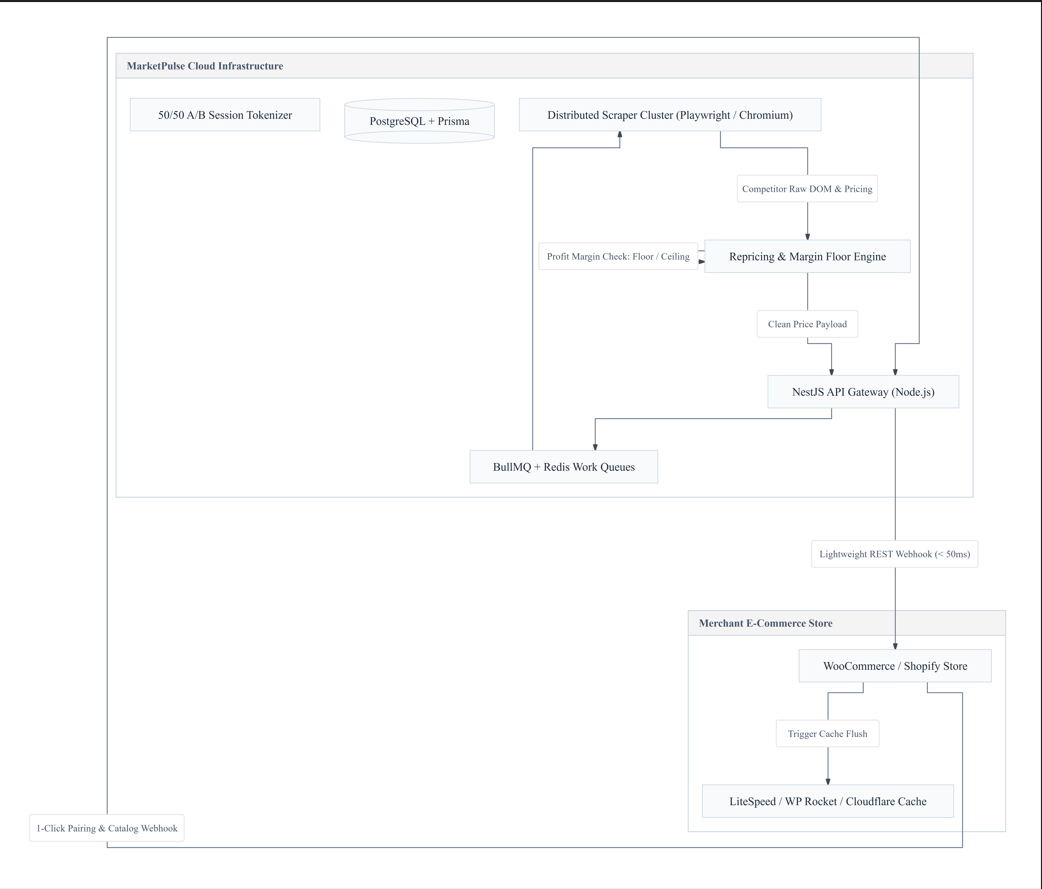
The Rule: The Merchant Store Does Almost Nothing
The merchant's store never fetches an external competitor URL. The merchant's store never spawns a headless browser. The merchant's store only does two things: Sends us product metadata (SKU, title, base price, competitor links) via an authenticated webhook when a product changes. Receives a clean, pre-validated price update payload via REST API and commits it in under 50ms.
All scraping, browser rendering, fingerprint rotation, currency normalization, and margin safety calculations happen entirely on our cloud.
2. Scraping Without Getting IP-Banned or Melting CPUs
If you’ve ever built a web scraper for e-commerce, you know the ugly truth: every store structures their DOM differently, and anti-bot systems hate you.
One competitor uses Shopify with JSON-LD schema. Another runs custom React with hydrated hydration states. A third uses obfuscated HTML class names (class="css-1a2b3c") that change every weekly deployment.
Tier 1: The "No-Browser" Fast Path (70% of targets)
Launching a full Chromium instance takes ~800ms and ~60MB of RAM. If you do that for 50,000 tracked products, your infrastructure bills will explode.
Before launching Chromium, our worker tries high-speed HTTP extraction:
1. Direct JSON-LD parsing: 60% of modern e-commerce sites embed <script type="application/ld+json"> containing clean price, priceCurrency, and availability. We parse this in ~8ms using Cheerio without rendering JavaScript.
2. Shopify Product Endpoint: If the competitor is on Shopify, appending .json to the product URL (example.com/products/leather-boots.json) returns pure, structured JSON data without requiring any DOM parsing.
Tier 2: The Headless Playwright Fallback (30% of targets)
When a target site renders prices exclusively client-side or hides behind heavy JavaScript hydration, the job gets escalated to our Playwright pool.
// A simplified slice of our resilient extraction handler
export async function extractCompetitorData(page: Page, targetUrl: string): Promise<ScrapeResult> {
  // Strip unnecessary resource types to keep memory tight
  await page.route('**/*', (route) => {
    const resource = route.request().resourceType();
    if (['image', 'media', 'font', 'stylesheet'].includes(resource)) {
      return route.abort();
    }
    return route.continue();
  });

  const response = await page.goto(targetUrl, {
    waitUntil: 'domcontentloaded',
    timeout: 12000
  });

  // Evaluate price with multiple DOM fallbacks
  const extracted = await page.evaluate(() => {
    const selectors = [
      '[data-product-price]',
      '.price--current',
      '#priceblock_ourprice',
      'meta[property="og:price:amount"]'
    ];
    for (const sel of selectors) {
      const el = document.querySelector(sel);
      if (el) {
        const text = el.getAttribute('content') || el.textContent;
        if (text && /\d/.test(text)) return text;
      }
    }
    return null;
  });

  return parseCurrencyAndPrice(extracted);
}
Blocking images, stylesheets, and fonts reduced our per-page scraping latency from 4.2s down to 850ms, while dropping worker memory consumption by 68%.
3. The Math: Preventing the "Race to the Bottom" Death Spiral
A common fear among merchants is: "If my competitor lowers their price to $5, will your algorithm drop my price to $4.90 until I go bankrupt?"
In competitive repricing, automated price wars are real. If two bots compete without constraints, both merchants end up selling at a loss.
To eliminate this, we designed a Triple-Layer Net:
export function calculateOptimalPrice(params: {
  currentPrice: number;
  costPrice: number;
  floorPrice: number;
  ceilingPrice?: number;
  minMarginPercent?: number;
  strategy: 'beat_lowest' | 'match_lowest' | 'market_average' | 'premium_brand';
  competitorPrices: number[];
}): PriceCalculationResult {
  const { currentPrice, costPrice, floorPrice, ceilingPrice, minMarginPercent, strategy, competitorPrices } = params;

  if (!competitorPrices.length) {
    return { finalPrice: currentPrice, reason: 'No active competitor data found' };
  }

  // 1. Raw Strategy Calculation
  let targetPrice: number;
  const lowest = Math.min(...competitorPrices);

  switch (strategy) {
    case 'beat_lowest':
      targetPrice = lowest - 1.00; // Beat by $1 or custom delta
      break;
    case 'match_lowest':
      targetPrice = lowest;
      break;
    case 'market_average':
      targetPrice = competitorPrices.reduce((a, b) => a + b, 0) / competitorPrices.length;
      break;
    case 'premium_brand':
      targetPrice = Math.max(...competitorPrices) * 1.05; // 5% above highest
      break;
  }

  // 2. Ironclad Profit Floor Clamp
  let safePrice = Math.max(targetPrice, floorPrice);

  // 3. Minimum Gross Margin Clamp (e.g. at least 20% margin above cost)
  if (costPrice > 0 && minMarginPercent) {
    const absoluteMinimumCostPrice = costPrice * (1 + minMarginPercent / 100);
    safePrice = Math.max(safePrice, absoluteMinimumCostPrice);
  }

  // 4. Optional Ceiling Clamp
  if (ceilingPrice && safePrice > ceilingPrice) {
    safePrice = ceilingPrice;
  }

  return {
    finalPrice: Number(safePrice.toFixed(2)),
    clampedByFloor: safePrice === floorPrice,
    clampedByMargin: costPrice > 0 && safePrice === (costPrice * (1 + (minMarginPercent ?? 0) / 100))
  };
}
No matter how aggressively a competitor slashes their price, the algorithm will hard-clamp at the merchant's configured minimum gross margin.
4. The Zero-Flicker Storefront A/B Testing Challenge
Most A/B split-testing tools for e-commerce (like Google Optimize or client-side JavaScript scripts) work by injecting a script on the frontend. When the page loads, the script changes the price DOM element or product title:
User visits page -> $99 flashes on screen -> JS script runs 300ms later -> $89 appears
This visual flicker triggers severe Cumulative Layout Shift (CLS), alarms savvy buyers ("why did the price just change before my eyes?"), and ruins conversion rates.
How We Solved It: Server-Side 50/50 Rendering with Sticky Session Hashing
In our WooCommerce plugin and Shopify extension, the variant decision is made on the server before the HTML is flushed to the browser:
// In our WooCommerce companion plugin:
public function filter_product_price($price, $product) {
    $experiment = $this->get_active_ab_experiment($product->get_id());
    if (!$experiment) return $price;

    // Cookie-based sticky hashing (GDPR compliant, zero personal data)
    $visitor_bucket = $this->get_visitor_bucket(); // Returns 'A' or 'B' (50/50)

    if ($visitor_bucket === 'B') {
        return $experiment['variant_b_price'];
    }

    return $price;
}
-
Zero Layout Shift (CLS: 0.00): The browser receives the exact price in the initial HTML payload. There is zero visual jump.
-
Sticky Persistence: A user assigned to Variant B stays on Variant B through their cart, checkout, and return visits via a lightweight anonymous session hash.
-
Real-Time Financial Metrics: Instead of just measuring clicks, we stream conversion data into our dashboard to calculate Revenue Per Visitor (RPV):
RPV=Total Unique Visitors/Total Revenue Generated
If Variant B has a 3% lower conversion rate but a 15% higher price point, your net revenue might actually be $1,200 higher. Raw conversion rate alone can lie; RPV tells the financial truth.
5. Cache Busting: The Silent Killer
Here is a bug that took us three days to diagnose during early beta testing.
Our background worker scraped an Amazon competitor, detected a price drop, recalculated the merchant's price, and updated the WooCommerce database via REST API. The database showed the new price: $79.00.
Yet, when customers opened the product page, they still saw the old price: $89.00.
Why? Because the store was running LiteSpeed Cache and Cloudflare. The database had updated, but the static HTML cache was serving stale cached pages.
To fix this, we built native event-driven cache purgers directly into our integration:
// Fired immediately after an automated price update commits
public function purge_third_party_caches($product_id) {
    // 1. LiteSpeed Cache
    if (defined('LSCWP_V')) {
        do_action('litespeed_purge_post', $product_id);
    }
    // 2. WP Rocket
    if (function_exists('rocket_clean_post')) {
        rocket_clean_post($product_id);
    }
    // 3. W3 Total Cache
    if (function_exists('w3tc_flush_post')) {
        w3tc_flush_post($product_id);
    }
    // 4. Cloudflare CDN Purge via API Hook
    $this->purge_cloudflare_cache_url(get_permalink($product_id));
}
The second a price recalculation completes, the edge cache is purged instantly. Shoppers always see the real-time price.
6. What’s Next & Key Takeaways
Building MarketPulse taught us several hard truths about modern e-commerce engineering:
-
Keep customer servers dumb and fast: Offload every piece of resource-intensive computation to your own cloud. Merchants will love you for not touching their server load.
-
Never trust third-party DOMs: Assume selectors will break. Build multi-tiered fallbacks (JSON-LD -> OpenGraph -> Meta tags -> Fallback selector heuristics).
-
Protect margins at all costs: Repricing algorithms without strict floor clamps will inevitably lead to disastrous price-slashing spirals.
-
Server-side CRO beats client-side every time: No merchant wants their customer to see numbers flashing and changing on the screen. If you run an e-commerce store on WooCommerce or Shopify and are tired of losing sales to competitors or doing manual spreadsheet updates every morning, check out MarketPulse (we offer a 14-day free trial on the Starter plan). I’d love to hear how other teams handle distributed browser automation, proxy rotation, and cache invalidation at scale. Drop your questions or war stories in the comments below!
Frequently asked questions
Does running MarketPulse slow down or impact my WooCommerce or Shopify store hosting?
+
No. MarketPulse operates on a 100% decoupled companion architecture. All web scraping, headless Chrome rendering, and repricing algorithms run entirely on our cloud infrastructure. Your store host never runs scraping scripts and only receives lightweight REST price update payloads committing in under 50ms.
How does MarketPulse's 50/50 A/B testing avoid visual layout flicker (CLS)?
+
Traditional split-testing tools rely on client-side JavaScript that replaces prices after the page loads, causing jarring visual jumps. MarketPulse renders price variations server-side before the HTML is sent to the browser, ensuring a Cumulative Layout Shift (CLS) of 0.00 with zero visual flicker.
What prevents the repricing algorithm from starting a "race-to-the-bottom" price war?
+
MarketPulse enforces an ironclad Triple-Layer Profit Net: a mandatory Minimum Allowed Price Floor, an optional Ceiling, and an automated Cost Margin Clamp. Even if a competitor drops their price below cost, MarketPulse will never lower your price below your configured margin floor.
Does MarketPulse work with WordPress caching plugins like LiteSpeed and WP Rocket?
+
Yes. MarketPulse includes native event-driven cache-clearing hooks for LiteSpeed Cache, WP Rocket, W3 Total Cache, Breeze, and Cloudflare. The exact second a price updates in the database, the static edge cache for that specific product is purged automatically.
We build MarketPulse, competitor price monitoring and automated repricing for e-commerce sellers. About us
See how MarketPulse handles this, automatically
Competitor price, stock and review-count tracking, automated repricing behind a price floor, and alerts pushed to Telegram or WhatsApp the moment something changes.
14-day free trial · No card required